Why Data Structures Matter: Lessons from the Linux Kernel
Why data structures decide speed and scale, with seven real examples from the Linux kernel: lists, hash tables, bitmaps and trees.
Every program does two things: it stores data, and it works on that data. The way you arrange the data decides how fast the work goes, how much memory it takes, and how painful the code is to change. That arrangement is a data structure, and it is the difference between code that merely runs and code that keeps running when the input grows a thousand times.
This is not just an exam topic. Operating systems are built from data structures, and the Linux kernel is one of the best places to see them working. In this series we will look at each structure in its own post. This first post covers why they matter and the ideas every later post builds on, with real examples from the Linux kernel, the operating system that runs most of the world's servers and phones. Kernels change over time, so some details have since been replaced, but the thinking behind them has not.
What a data structure really is
A data structure is a way of organizing data in memory together with the operations you can do on it: add, remove, find, and walk through everything. Each structure makes some operations cheap and others expensive. There is no best one, only the best fit for what your program does most often.
That is why developers talk about trade-offs:
- Array: very fast access by position, slow to insert in the middle.
- Linked list: cheap insert and remove once you hold the spot, slow to search.
- Hash table: very fast lookup by key, but items have no natural order.
- Tree: keeps items sorted and finds things in a handful of steps instead of scanning everything.
- Stack and queue: control the order in which work is handled, last in first out or first in first out.
Why scale makes this matter
With ten items, any structure works. With ten million, a search that checks every item one by one becomes unusable, while a tree needs only a few dozen steps. This is what Big O notation describes: not seconds, but how the work grows as the data grows. Choosing the right structure is usually a bigger win than any amount of clever tuning later.
Seven places the Linux kernel uses them
The kernel cannot afford slow lookups, because every program on the machine depends on it. Here is what its authors reached for.
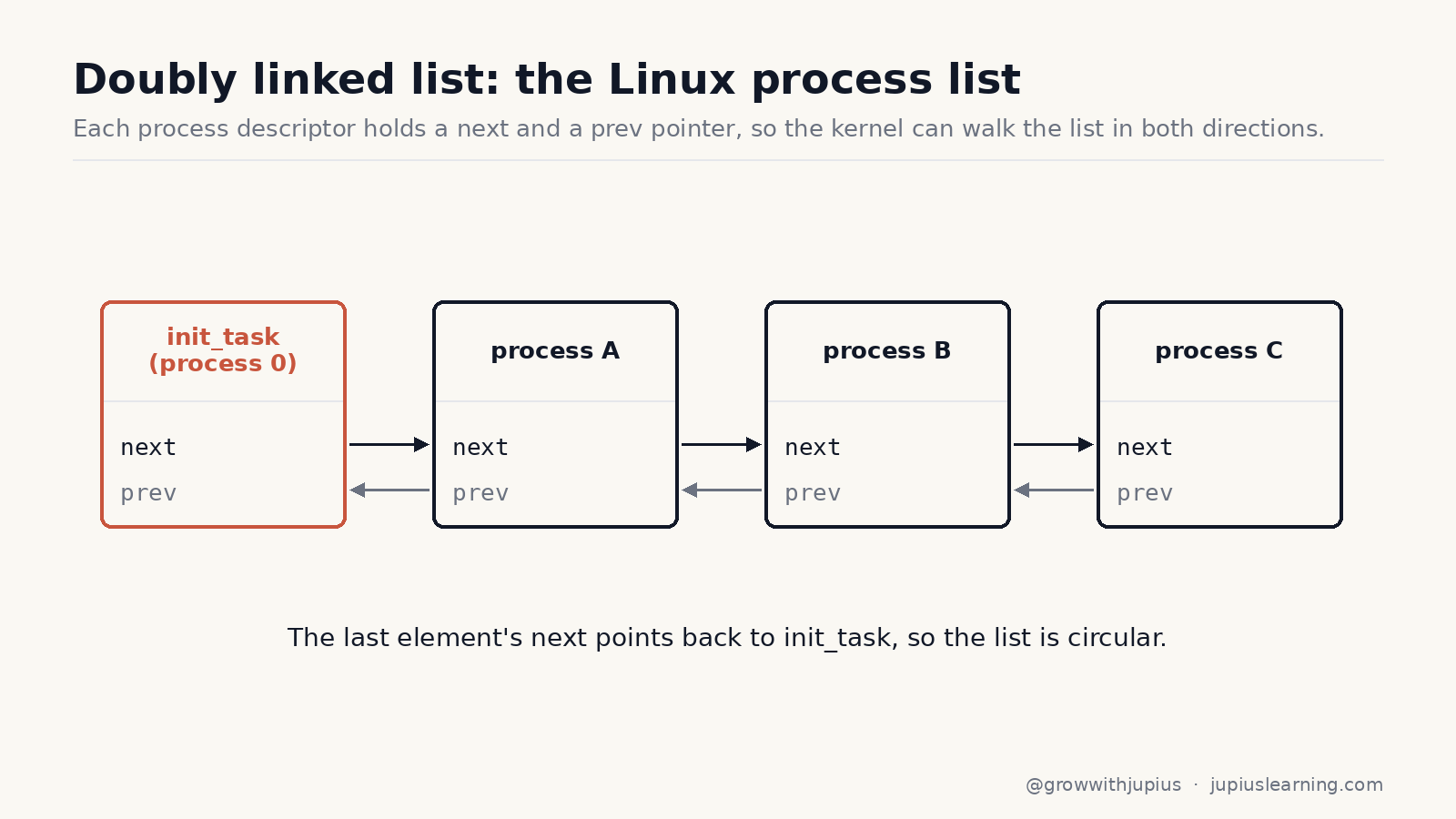
1. Doubly linked lists keep track of every process. The kernel defines one small, generic list element with a pointer to the next and previous items, and embeds it inside other structures. The same list code is reused for many different lists instead of being rewritten each time. The list of all processes in the system is built this way.
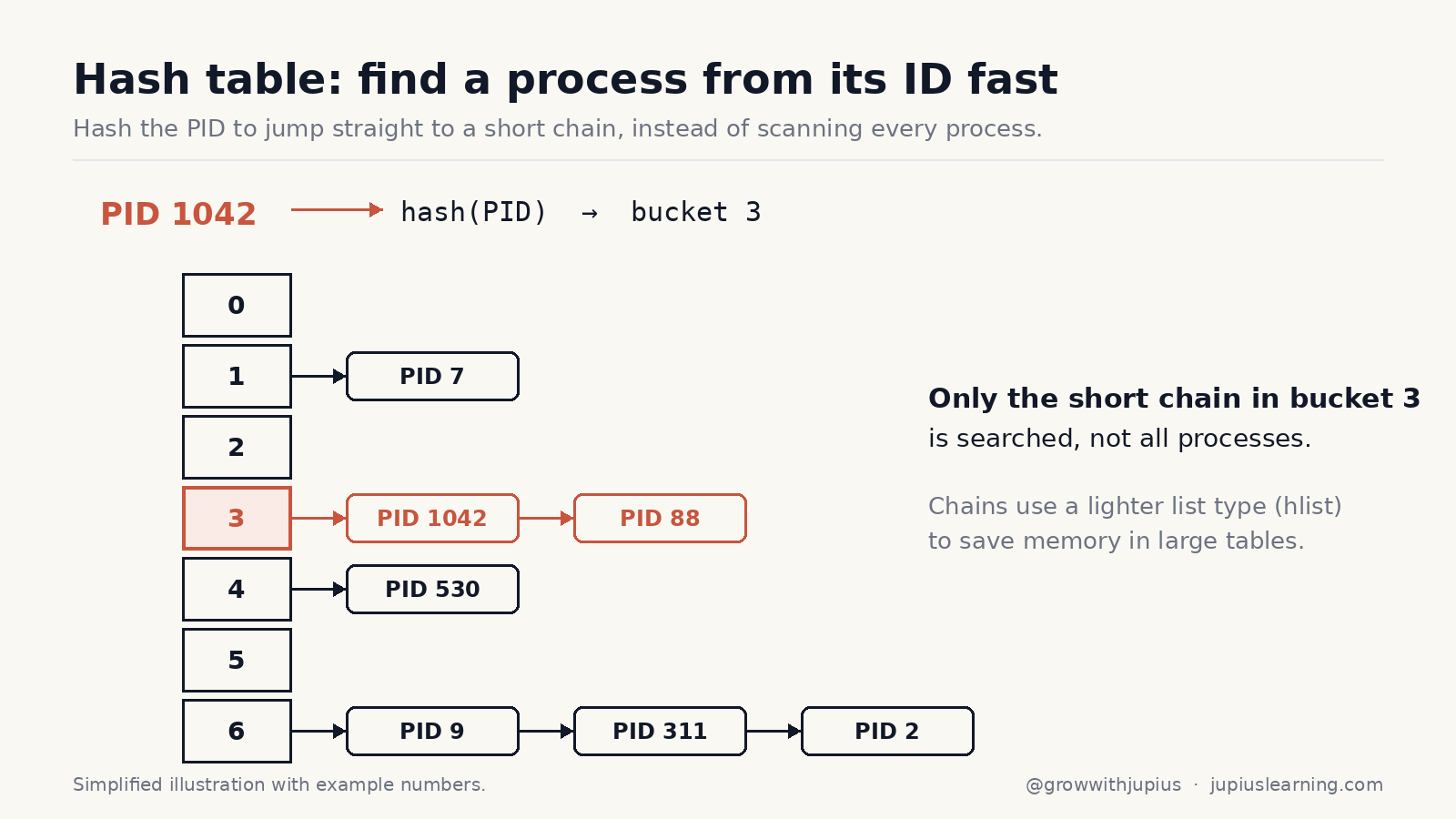
2. Hash tables find a process from its ID. Walking a list of every process to find one ID would be slow, so the kernel hashes the process ID to jump to a short chain. For hash tables it uses a lighter list variant whose head is a single pointer, because with many buckets, saving memory matters.
3. Bitmaps hand out process IDs. To recycle ID numbers, the kernel keeps a bitmap where each bit says whether a number is taken. In the kernel, one 4 KB memory page of this bitmap covers 32,768 IDs. One bit per item is about the smallest way to store a yes or no answer.
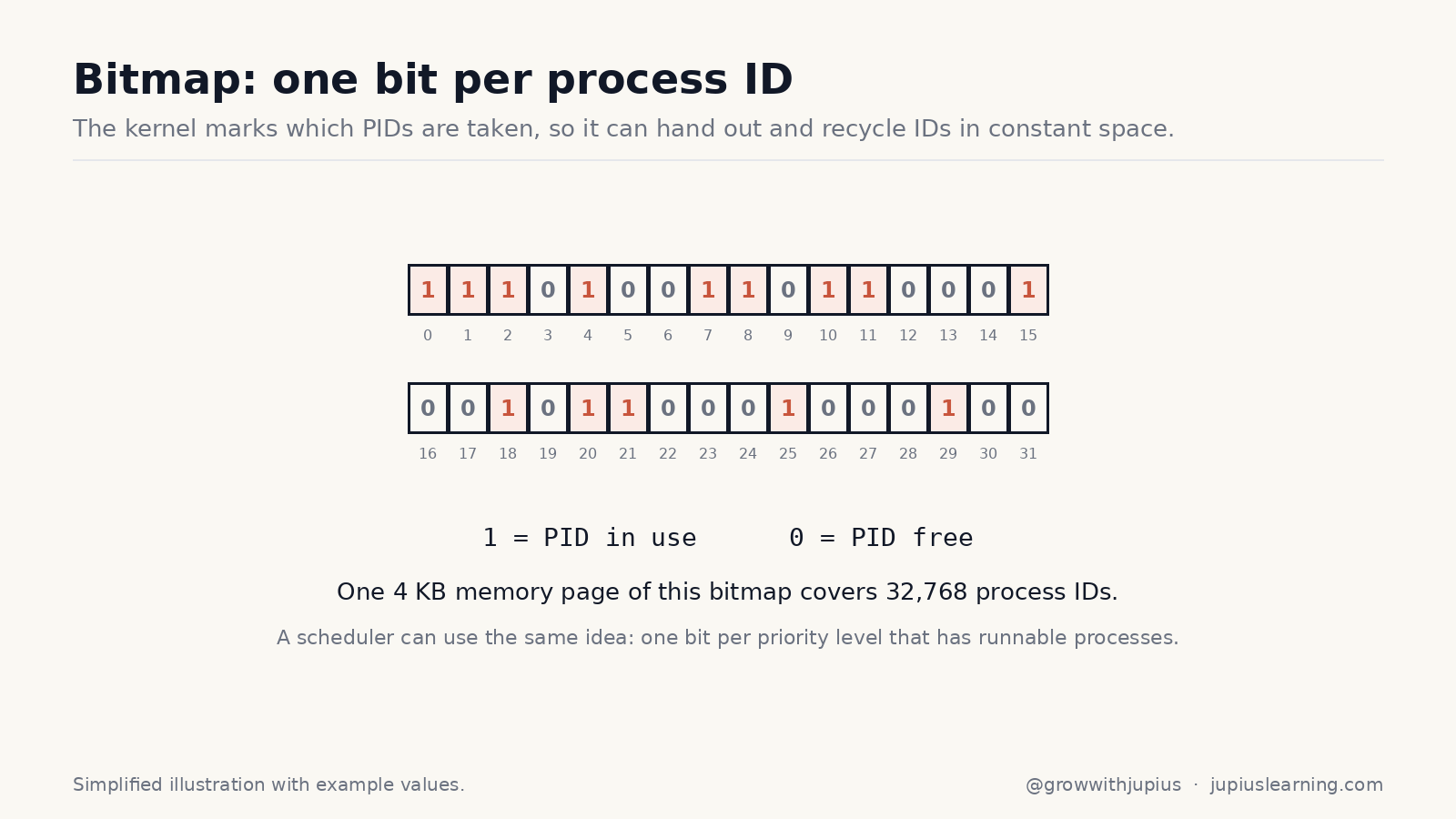
4. Another bitmap makes scheduling fast. The scheduler of that era kept a priority bitmap, with one bit per priority level that has runnable processes. Finding the next process to run means finding the first set bit, which takes the same short time however many processes exist.
5. Red-black trees organize a program's memory regions. A process owns many separate regions of memory. When there are too many for a list to be quick, Linux 2.6 keeps them in a red-black tree. This is a balanced, sorted tree whose rules guarantee that no path is much longer than any other, so lookups stay fast even in the worst case.
6. Radix trees speed up the file cache. Files can be terabytes long, and the kernel keeps recently used pages in memory. To check whether a page is already cached, it treats the page number as a path through a tree where each node holds up to 64 pointers. A lookup walks a few levels instead of scanning thousands of pages.
7. Stacks and circular buffers run underneath everything. Each process gets its own kernel stack, a small area that holds function calls and local data in last-in-first-out order. For hardware transfers, the kernel uses a circular buffer, where the device keeps filling slots while the processor empties them, smoothing out busy moments.
What to take from this
- Operating systems, databases, browsers and compilers all run on a small set of data structures.
- Every structure trades one kind of speed for another.
- Real systems often combine several. The kernel pairs lists with hash tables, and trees with bitmaps.
- The right structure often matters more than faster hardware.
What comes next
Next we will take the structures one at a time, starting with stacks, queues and linked lists, each with real-world examples, small code and practice questions. If you want to practise as you read, our C and data structures course covers all of these hands-on.