Queues Explained with Real Examples from the Linux Kernel
Learn how a queue works, build a small circular queue in C, and see how the Linux kernel uses queues for sleeping processes, the runqueue and pipes.
In the last post we looked at the stack, where the last thing in is the first thing out. This time we look at its opposite, the queue. It is just as simple, and the Linux kernel leans on it all the time.
Let's start with the idea, write a small one in C, and then see where the kernel uses it.
What is a queue?
Think of the line at a ticket counter. A new person joins at the back. The person at the front gets served and leaves. Nobody jumps ahead. The first person who came is the first person who gets a ticket.
That rule is called first in, first out, or FIFO. A queue has two main actions:
- Enqueue adds a new item at the back
- Dequeue takes the item at the front
Most queues also let you check if they are empty or full.
The big difference from a stack is fairness. A queue always serves the item that has waited the longest.
A tiny queue in C
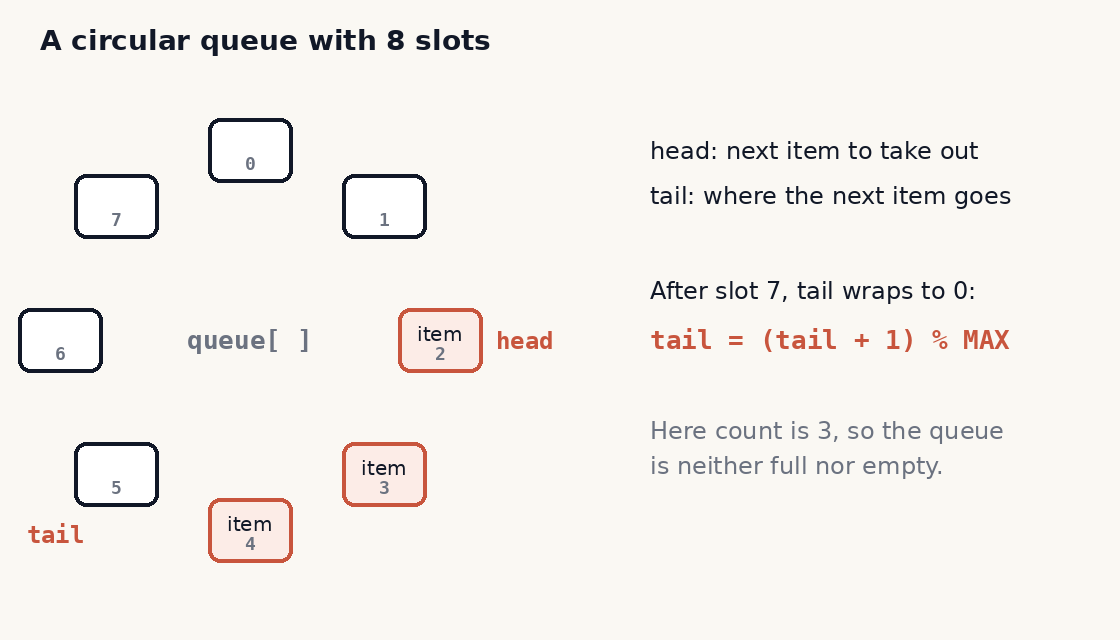
The easy way to build a queue is with an array and two positions. One position, head, marks the front. The other, tail, marks where the next item goes. But there is a catch. If you only ever move forward, you soon reach the end of the array, even though the front part is now empty.
The fix is to wrap around. When tail or head reaches the end, it goes back to 0. This is called a circular buffer, or ring buffer. Picture the array bent into a circle.
#define MAX 8

int queue[MAX];
int head = 0;     /* where the next item is taken from */
int tail = 0;     /* where the next item goes in */
int count = 0;    /* how many items are waiting */

int enqueue(int x) {
    if (count == MAX) return -1;    /* full, so we stop */
    queue[tail] = x;
    tail = (tail + 1) % MAX;        /* wrap around to the start */
    count++;
    return 0;
}

int dequeue(int *x) {
    if (count == 0) return -1;      /* empty, nothing to give */
    *x = queue[head];
    head = (head + 1) % MAX;
    count--;
    return 0;
}
The % MAX part does the wrap. If tail is 7 and MAX is 8, then (7 + 1) % 8 is 0, so the next item goes back at the start. The count tells us if the queue is full or empty, because head == tail can mean either one.
Like the stack, both actions take the same short time no matter how many items are waiting.
Where the Linux kernel uses queues
The examples below are from the Linux 2.6 kernel. Newer kernels have changed some details, but the ideas are still there.
Wait queues for sleeping processes
A process often has to wait for something. It may be waiting for a disk read to finish, or for a resource to be free. There is no point keeping the CPU busy while it waits. So the kernel puts it to sleep on a wait queue and runs something else.
Each wait queue belongs to one kind of event. When the event happens, the kernel wakes the processes sleeping on it. Inside, a wait queue is a doubly linked list. Each item points to a sleeping process. The head of the list also has a lock, because interrupt handlers and normal kernel code can both change it.
There is a nice detail here. Sometimes many processes wait for a resource that only one of them can use. Waking all of them would be a waste, since only one would win and the rest would go back to sleep. This is called the "thundering herd" problem. To avoid it, such processes are marked as exclusive and added at the back of the list, and the kernel wakes only one of them at a time.
Read/write semaphores in strict FIFO order
A semaphore is a kind of lock. When a process can't get it, the process sleeps on the semaphore's wait queue. For read/write semaphores, the kernel handles the waiting processes in strict FIFO order. Each new waiter joins at the back. When the lock is released, the kernel looks at the process at the front first. That is a ticket counter line, written in kernel code.
The runqueue
Processes that are ready to run sit on the runqueue. Older versions kept one big list and had to scan all of it to pick the best process. Linux 2.6 split it into 140 lists, one for each priority level, and each CPU got its own set.
When a process becomes ready, the function enqueue_task() adds it to the tail of the list for its priority. The kernel also has dequeue_task() to take it out. So within one priority level, processes line up and take turns. For round robin real-time processes, the one that gets the CPU is moved to the end of its list, so others of the same priority get a fair share.
Pipes as a circular buffer
When you type ls | grep txt, the two programs talk through a pipe. From Linux 2.6.11, each pipe uses 16 buffers, and the kernel treats them as one circular buffer. Writers keep adding data. Readers keep taking it out from the front. To find the first empty buffer, the kernel adds the current buffer index and the number of full buffers, modulo 16. That is the same % MAX trick from our code above.
Queue or stack?
How do you pick? Ask one question: who should be served next?
If the newest item should go first, use a stack. Function calls and undo work that way.
If the oldest item should go first, use a queue. This is what you want when things arrive over time and each one should get its turn, like print jobs or network packets. It is also the base of breadth first search in graphs, where you visit nodes level by level.
Try it yourself
- Add a
peek()function to the code above that returns the front item without removing it. - Change the queue to use a linked list instead of an array, so it has no fixed size.
- Build a queue using two stacks. It is a common interview question.
What comes next
Next in the series is the linked list, which we have already met twice here, inside wait queues and the runqueue. If you want to write these structures yourself and see them run, our C and data structures course at /courses/c-ds-a/ walks through them step by step.